


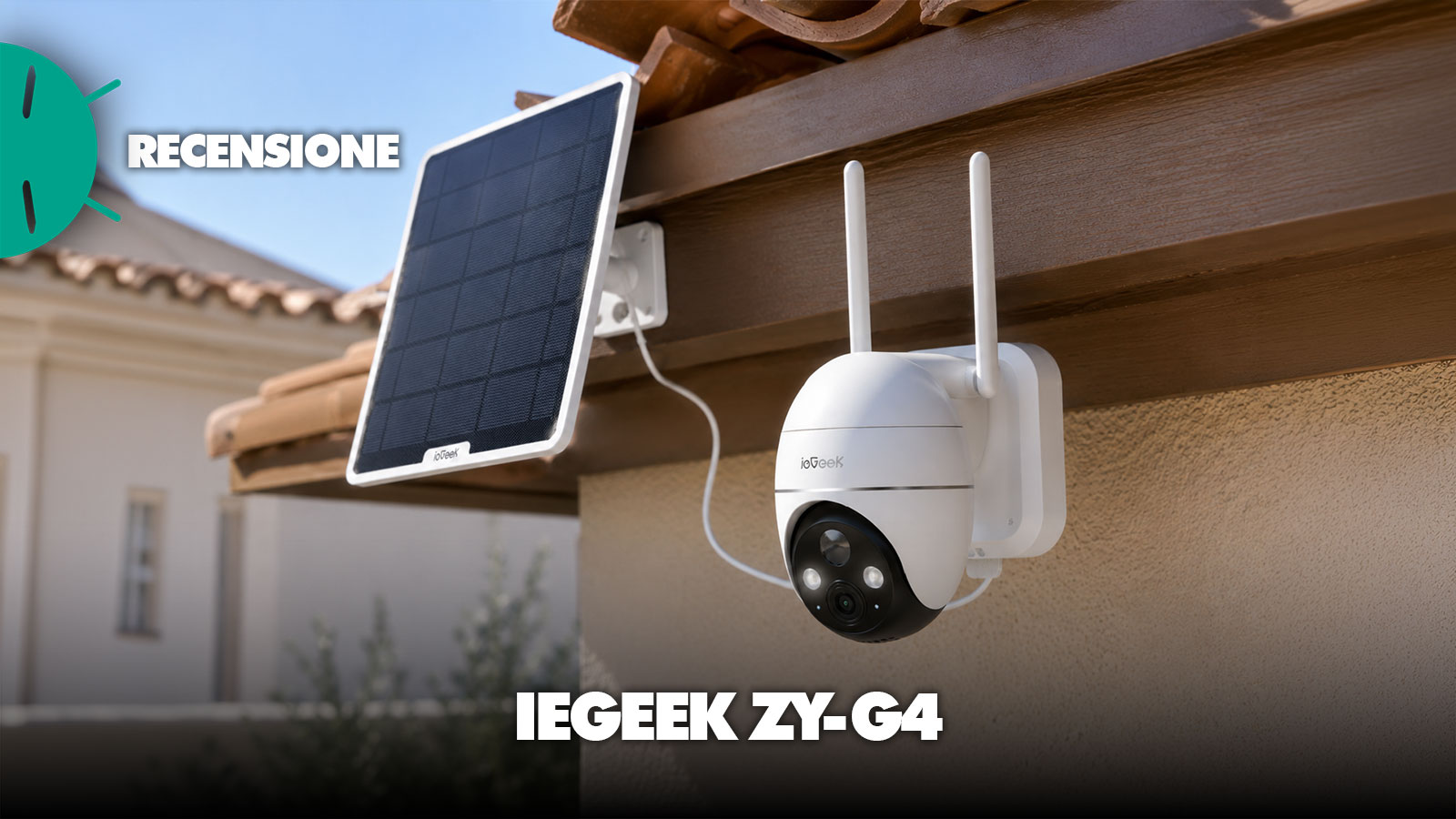
Installing a surveillance camera around the home has become quite straightforward as long as there is a power outlet nearby and good Wi‑Fi coverage, while the situation changes completely when we need to monitor land, a garage distant from the house, a construction site, a second home or simply a point on the property where providing network and power would require more work than the camera itself. It is mainly thinking about situations like these that the ieGeek ZY-G4, an outdoor camera that abandons the classic Wi‑Fi connection and instead relies on the mobile 4G LTE network, paired with an internal battery and a solar panel which, under the right conditions, allows reducing virtually to zero the need to intervene manually for recharging. The manufacturer presents it as an off‑grid solution intended especially for farms, construction sites and remote properties, i.e., precisely those contexts where a fixed connection or traditional power supply are not easily available.
And it is precisely this independence that represents the most interesting feature of the ZY-G4, because after installing it you quickly realize that its real advantage lies not so much in the single technical datum but in the ability to choose the best point to monitor without worrying about where the router is located. To this is added a set of features that makes the ZY-G4 decidedly more complete than a simple static camera, because the head is motorized, it can automatically follow a subject, it records in 2K at 3 MP, it has color night vision and above all it integrates the AOV, Always On Video mode, designed to offer a broader context than classic battery cameras that start recording only when the sensor detects motion.
Review ieGeek ZY-G4
Design and Materials
Right out of the box, the ZY-G4 conveys the impression of a product built more for practicality than for discretion, with a fairly substantial body, the two top antennas dedicated to connectivity and a lower motorized section housing the optical assembly and allowing the camera to survey practically the entire surrounding area. It is therefore not the kind of product that is easy to hide once mounted on the facade, but given that we are talking about an outdoor camera that must be easily recognizable even as a deterrent, this is not necessarily a drawback, though opinions differ on this topic.

The feeling during installation is more about a system designed to avoid unnecessary complications, because the camera mount is first fixed to the wall and the body can then be attached directly to the base, while the solar panel uses a separate and adjustable support. This separation is particularly useful in practice, since camera and panel do not necessarily have to point in the same direction: we can thus choose the best framing for the ZY-G4 and at the same time place the panel where it can receive more hours of light during the day, a solution much more sensible than models where the two elements form basically a single unit.
The build is clearly designed for outdoor use and the manufacturer states an IPX5 rating for the camera body, thus providing adequate protection for exposure to normal weather conditions, while noting that, as with any device of this type, choosing a point that is at least partially sheltered remains a good idea when possible. At the bottom, protected from the elements, we find the controls and slots necessary for managing the camera, including the microSD and SIM slots, two important elements because they allow local recording and remote access through the cellular network.


Once mounted, the motorized head offers a very wide range of motion and allows you to adjust the framing without having to intervene physically on the camera anymore, which is particularly convenient when the ZY-G4 is installed quite high up or in a position that is not easily accessible. The movement is not completely instantaneous when commanded remotely and, to be honest, in some cases you notice a small delay between the command issued via the joystick and the actual movement, but in surveillance camera use it doesn’t become a particularly troublesome limitation.
Setup and smartphone app
One of the initial doubts with a 4G camera can concern the setup, because the absence of Wi‑Fi might lead you to imagine a more laborious procedure than that of common home IP cameras, while with the ZY-G4 the process is basically guided by the app and takes only a few minutes.
After powering the camera, from the ieGeek Cam app you add a new device and the fastest method is to scan the QR code present directly on the body of the ZY-G4, thus avoiding having to manually search for the model within the various menus; the recognition and pairing are completed quickly and, once a name is assigned to the camera, it appears on the main screen ready to be controlled.

Remote operation is entirely based on the cellular network and in the package a SIM is provided with 7 days of data traffic trial, useful to get the camera up and running immediately without having to immediately provision your own plan, while subsequently it’s possible to use a compatible Nano SIM chosen based on the available coverage in the installation area. Note that the SIM used must support both data and voice traffic, a detail to keep in mind especially if you plan to reuse an existing card; in the end, considering the thousands of low-cost options on the market with everything included for a few euros a month, using such a SIM is more logical than a dedicated “surveillance” plan, slightly cheaper but with much less data.
However, it is after the first setup that the app becomes a decidedly important part of the experience, because practically all the camera’s functions pass through it and fortunately the interface, while offering many options, remains fairly easy to understand. From the main screen we can see the connected cameras, access the live view or view more than one, while entering the individual device we find the events detected during the day and can quickly jump from the notification to the corresponding recording stored on the card. As with other models, ieGeek also offers multi‑user access here, where permissions can be granted on the individual cameras if you have multiple devices.


The review of the recordings is one of the aspects I found most interesting precisely thanks to the AOV operation, because instead of having just a long sequence of disconnected clips you get a timeline where time keeps running even during periods when nothing happens, while the most significant events are immediately identifiable. In practice the camera maintains low‑power recording when the scene is still and switches to a smoother capture when activity is detected, allowing you to better reconstruct what happened without filling the microSD with hours of completely still video. It is an approach that during review proves far more useful than simply reading the AOV label on the box.

From the live view it is also possible to take a photo, start a recording manually, use two‑way audio and, above all, control the movement of the head via a virtual joystick, while in the deeper menus you can manage alarms, sensitivity of detection, image configuration, lighting settings and those related to PTZ and tracking.
The amount of options is thus substantial, but I did not feel like I was facing an unnecessarily complicated app, also because the settings you use most frequently remain easily accessible and, once you find the configuration that suits your area, you will hardly need to keep returning to the more advanced menus.
Hardware features and image quality
The ZY-G4 records at a 2K 3 MP resolution, a value that on paper may seem nowadays normal given how many 4K cameras are on the market, but in practice it is more than enough for the intended use. Looking at daytime recordings, subjects crossing the frame remain clearly recognizable and the level of detail is adequate to understand what is happening in front of the camera, which is the truly important aspect in a surveillance system.
Obviously you should not expect 4K definition, but a person entering the captured area is clearly visible and the recordings retain the date and time of the event, making them easy to consult later. At night the ZY-G4 can instead leverage the integrated illumination to render color images, a solution I preferred when the goal is to identify more detail than the classic infrared mode in black and white, although naturally the result depends heavily on subject distance, ambient lighting and the mounting position chosen during installation. The manufacturer states a color night‑vision range of up to 20 meters, a figure that should be considered indicative since in practice it varies a lot depending on the scene captured.

On the detection front, the ZY-G4 focuses mainly on people and allows you to adjust both sensitivity and the zones to monitor, so as to avoid a deluge of notifications every time something moves at the edge of the frame. The customizable detection zones are a concrete and useful feature, because they allow excluding, for example, a road, a patch of vegetation or an area where we know people or vehicles will repeatedly pass, reducing false alarms and making notifications genuinely more meaningful.
When auto‑tracking is activated, the motorized head tries to keep the subject within the frame by moving automatically and, from tests, the behavior is convincing: as you walk through the monitored area the camera tracks the movement and, after losing the subject, can return to the preset position. It is not an infallible system and during use there can be some hesitation, especially when connectivity and distance come into play, but overall it adds a concrete advantage over a completely fixed camera. Then consider the true distinguishing element of the ZY‑G4, namely 4G LTE connectivity. In this case we are not dependent on the home router and we can install the device basically anywhere there is sufficiently stable cellular coverage, though this inevitably means having to consider a SIM and its data traffic as part of the system. Before choosing the exact mounting point, it is worth checking the signal quality of the operator you plan to use, because a camera that is powered but connected to an unstable mobile network would lose much of its utility.


During remote use you still have all the functions you would expect from a modern IP camera, including live streaming, playback of recordings, notifications and bidirectional communication, even if occasionally I encountered some connection issues, a factor to consider since final performance inevitably depends on the cellular network available at the installation site. For storage you can use a microSD up to 256 GB, a solution I personally consider almost indispensable if you intend to seriously leverage the AOV mode, because it allows you to store recordings directly on the camera without depending exclusively on cloud services. Space management and memory formatting can be performed directly from the app, while the manufacturer also provides a cloud solution for those who prefer to store recordings online.
Power and Battery
On the energy front, finally, the ZY-G4 includes a rechargeable 9,000 mAh battery paired with a 5 W solar panel included in the package. It is this latter component that really makes a difference in daily use, because once oriented correctly it helps keep the battery charged and turns the camera into a device that requires very little maintenance. ieGeek also claims a full recharge in about two hours under ideal conditions, but I would treat this as a theoretical reference rather than an absolute promise, given that sun exposure, panel tilt, time of year and weather conditions inevitably affect the actual result.
Talking about autonomy in absolute terms would still be less meaningful, since the number of detections, use of the live feed, tracking, the AOV mode and the quality of 4G coverage all come into play, but in a position with enough exposure the goal is clearly to avoid having to dismantle the camera for recharging.
Price and Considerations
And it is precisely by bringing together all these features that the ieGeek ZY-G4 makes sense, because evaluating it simply by comparing resolution and megapixels with those of a cheap Wi‑Fi camera would be misleading: here we are paying mainly for the ability to install a surveillance system in a location where a traditional camera would require additional work, a Wi‑Fi repeater or even a new electrical connection.
At the moment the ZY‑G4 is offered at €79.99, compared to a list price of €129.99, and it is around €80 that the product becomes particularly interesting, because it offers 4G connectivity, solar panel, PTZ movement, AOV, automatic tracking and local recording in a single system. Naturally the initial cost must be added to the recurring monthly cost of the SIM and its data plan, a recurring expense that we would not have with a normal Wi‑Fi camera and that must therefore be considered before purchase.
After using it, however, the prevailing impression is that the ieGeek ZY-G4 is a very specific product and for this reason well executed: if we need to monitor the driveway a few meters from the router there are probably simpler and cheaper solutions, while when the surveillance point is far from Wi‑Fi and a power outlet the combination of 4G and solar panel completely changes the installation possibilities.
The 2K quality is adequate, the app lets you manage virtually every function without particular complications and the automatic tracking has proven useful, but it is especially the AOV mode that convinced us in daily use, because it provides much more context than classic battery cameras that start recording only after a detection. It does not replace continuous high‑frame‑rate recording, but it represents an intelligent compromise between autonomy, space taken and the ability to reconstruct what happened during the day.
I link di acquisto presenti in questo articolo generano una piccola commissione per GizChina.it. Scopri tutti i dettagli qui.
Se non visualizzi correttamente il box qui sotto, prova a disattivare AdBlock.
⭐️ Scopri le migliori offerte online grazie al nostro canale Telegram esclusivo.