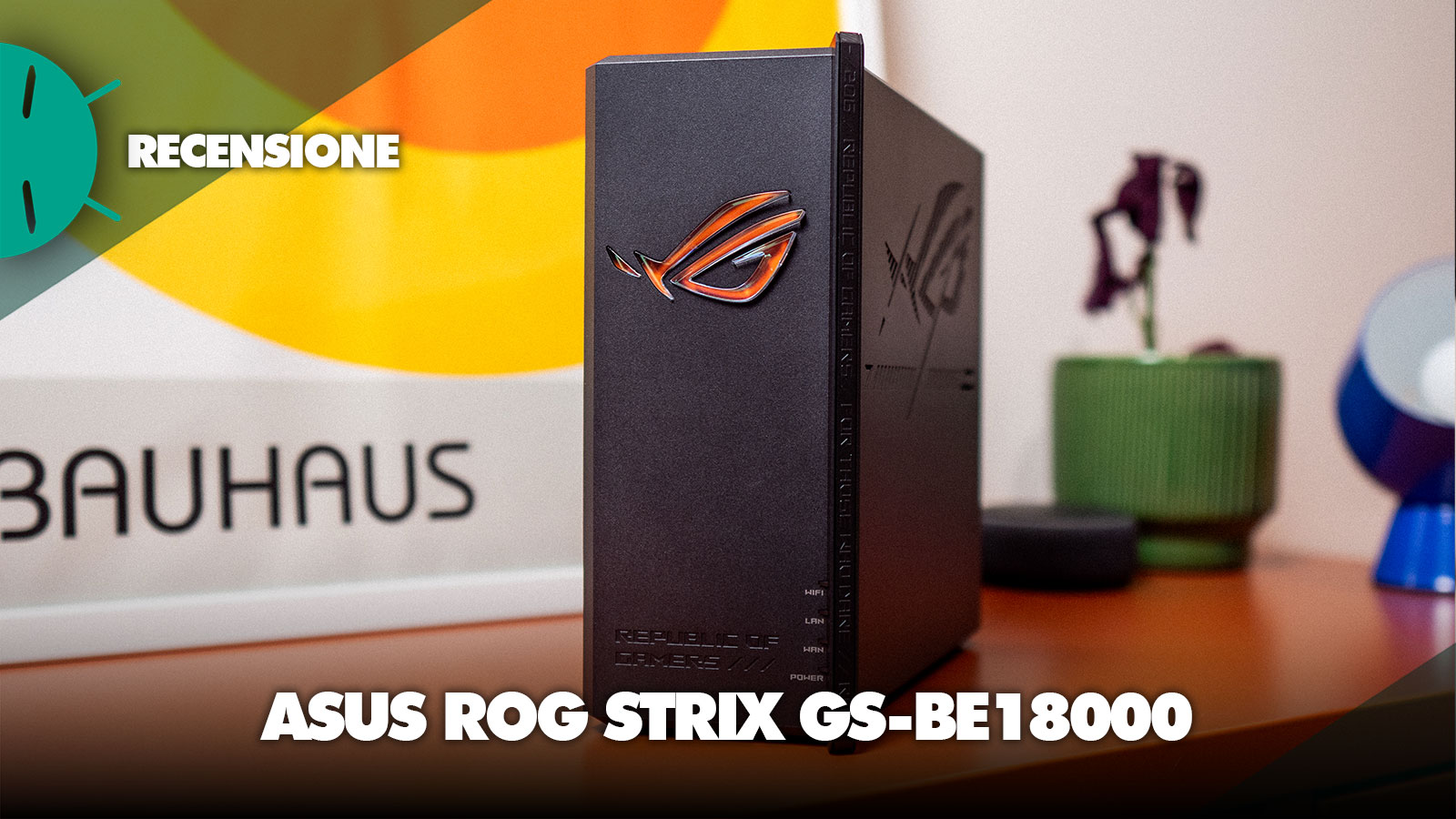
For years we have associated the concept of a “high-end gaming router” with spaceship-like devices lying on the desk, but with the new ROG Strix GS-BE18000, ASUS has decided to radically change the narrative. Taking it out of the box, the first sensation isn’t that you’re looking at a router, but at a museum-worthy, elite piece, almost a small compact PC with a vertical and slanted design.
The heart of this change lies in the stylistic language “Slash”: a dense, solid chassis without external appendages, which hides beneath its surface eight internal high-performance antennas. The classy touch is represented by the ROG logo with crystal finish: even with the LEDs off, it refracts ambient light with an elegance that is light-years ahead of the aggressive plastics of previous models. Once powered on, the RGB lighting spreads vibrantly but never intrusively, confirming that power can (and should) be accompanied by an aesthetic touch.
But it’s not only a design matter: the GS-BE18000 is a tri-band “monster” capable of delivering an overall bandwidth of 18 Gbps. The real experiential revolution, however, isn’t in the number itself, but in access to the 6GHz band. If the 2.4 and 5GHz frequencies are now commonplace, the 6GHz spectrum represents the future, reserved exclusively for your latest Wi‑Fi 7 devices, compatible with these speeds. Here, thanks to ultra-wide channels of 320MHz, latency flattens and stability becomes indistinguishable from that of an Ethernet cable, eliminating those lag spikes that often decide the outcome of competitive matches.
ASUS ROG Strix GS-BE18000 Review
Hardware and Technical Specifications
If the first visual impact is that of a design object, it’s when you lift it that you feel the true build quality: with its almost 930 grams, the GS-BE18000 conveys a sense of robustness and solidity typical of premium products. This weight is not accidental, but the result of an advanced thermal solution that uses heat-dissipation plates with a nano-coated carbon finish, a necessary choice to tame the router’s “heart”. We’re talking about a Broadcom Quad-Core 2.0 GHz processor paired with a solid 2GB of DDR4 RAM, a pairing that ensures the device stays cool and never overheats, handling massive data flows and dozens of connected devices without ever slowing down.

Looking at it up close, the “Slash” design isn’t just a styling exercise. The vertical structure allows the eight internal antennas to be positioned strategically to maximize coverage without the bulk of external antennas we’re used to. On the back, the port lineup tells a very clear story: ASUS has decided to transform this router into a high-performance switch. We indeed find a 2.5G WAN port and seven 2.5G LAN ports, a rare but smart configuration, perfect for those with a wired home who want every PC, console or NAS connected to run at maximum speed without bottlenecks.
However, there is a detail that raises an eyebrow among the more extreme enthusiasts: the absence of a 10G port. It’s a curious choice, almost paradoxical when you consider that the lower model (GS-BE7200X) is equipped with one. Although the seven 2.5G ports cover the needs of 99% of home users and gamers, those with ultra-fiber connectivity or a 10Gbps NAS will have to cope with this limit and look at other solutions.

The finishing touch comes from the side ventilation grille, which blends perfectly with the etched Republic of Gamers logos, reminding that, despite the almost “modern office” look, the machine’s DNA remains dedicated to extreme performance. The brand logo, of course, is backlit with AURA RGB as tradition, and is fully customizable within the router’s software interface, as well as disableable if it becomes annoying in the environment where you’ve installed it.
Performance and Wi-Fi
To thoroughly test a beast like the ROG Strix GS-BE18000, I decided to place it in a real-use context, rather than simulating the sending and receiving of random packets: I recently installed at home (finally, after years of waiting) a TIM Fiber line with a 2.5 Gbps profile. Although my geographic location limits the pure performance to around 2 Gbps down and 1 Gbps up, it proved to be the perfect test bed to see if the router could saturate the available bandwidth without hesitation.

The first test was a “muscular” one: I connected my MacBook Pro M1 Pro via a USB-C adapter to one of the 2.5G LAN ports. The result? A flat, granite-like line that instantly hit the limits of my connection (2.0/1.0 Gbps). The Broadcom chip’s packet handling is impeccable; even during massive download sessions, latency to game servers remained solid, a sign that the processor handles traffic with disarming ease.
But it’s with Wi‑Fi that the magic happens: armed with the Huawei Pura 80 Ultra and iPhone 17 Pro, both ready to talk Wi‑Fi 7, the experience changes radically, because on the 6GHz band, the GS-BE18000 turns the air into a virtual cable. While I walked around the house with the Huawei, I witnessed something rare: total ping stability; playing mobile competitive titles, the jitter graph was essentially a straight line. The MLO (Multi-Link Operation) technology lets devices connect to multiple bands simultaneously, and this not only increases pure speed but guarantees that, if you move into a 6GHz signal shadow, the transition to lower frequencies is imperceptible, never dropping a single data packet.

Often, erroneously, one tends to think that the internal antennas sacrifice coverage, including my initial assumption, but I must say that with this GS-BE18000 I managed to disprove this prejudice. In tests on the 5GHz band at long range (beyond two walls), this router showed surprising performance, consistently outperforming even some flagship models equipped with external antennas that are kilometers long. It seems that the internal arrangement of the eight antennas has been optimized to create a highly directed and penetrating signal beam, and I must say the difference is noticeable, even compared to my ASUS RT-BE82U, certainly from a different tier.

If I have to nitpick, USB 3.2 file management is a bit slower than wired network performance. It’s clear that ASUS has tuned this device to give absolute priority to low latency and to the speed of Wi‑Fi data traffic, rather than turning it into a makeshift NAS. Likewise, the 2.4GHz band does its job for smart devices, but this is not where the router shines: the GS-BE18000 is a machine built to race on 5 and 6GHz.
Software and Firmware
Managing the ROG Strix GS-BE18000 is a bit like taking the command seat of a professional server room, but with the aggressive and intuitive aesthetics typical of Republic of Gamers. The software isn’t just a backdrop: the ecosystem rests on the time-tested ASUSWRT 5.0, here dressed with a black and red ROG skin, which makes everything more “gaming”. The initial setup is almost disarming in its simplicity: via the ASUS Router App, you simply scan the QR code under the shell and follow the guided steps; in less than five minutes, my network was up and running. For more experienced users, of course, you can configure via the Web interface where the parameters are endless and it’s easy to get lost among the thousand settings, but a true nerd will know exactly where, how, when and why to tweak every single value.
<!– wp:pgcsimplygalleryblock/slider {"sliderAdminWidth":1068,"startPosIndex":0,"galleryType":"pgc_sgb_slider","galleryId":"53c54837","images":[{"id":640810,"title":"Screenshot","url":"https://gizchina.it/wp-content/uploads/2026/03/arecensione-router-fibra-asus-rog-strix-gs-be18000-prezzo-offerta-coupon-italia2.jpg","link":"https://gizchina.it/?attachment_id=640810","alt":"","description":"","caption":"Screenshot","mime":"image/jpeg","type":"image","width":2117,"height":1200,"sizes":{"thumbnail":{"height":150,"width":150,"url":"https://gizchina.it/wp-content/uploads/2026/03/arecensione-router-fibra-asus-rog-strix-gs-be18000-prezzo-offerta-coupon-italia2-150×150.jpg","orientation":"landscape"},"medium":{"height":170,"width":300,"url":"https://gizchina.it/wp-content/uploads/2026/03/arecensione-router-fibra-asus-rog-strix-gs-be18000-prezzo-offerta-coupon-italia2-300×170.jpg","orientation":"landscape"},"large":{"height":680,"width":1200,"url":"https://gizchina.it/wp-content/uploads/2026/03/arecensione-router-fibra-asus-rog-strix-gs-be18000-prezzo-offerta-coupon-italia2-1200×680.jpg","orientation":"landscape"},"full":{"url":"https://gizchina.it/wp-content/uploads/2026/03/arecensione-router-fibra-asus-rog-strix-gs-be18000-prezzo-offerta-coupon-italia2.jpg","height":1200,"width":2117,"orientation":"landscape"}},"imageMeta":{"aperture":"0","credit":"","camera":"","caption":"Screenshot","created_timestamp":"0","copyright":"","focal_length":"0","iso":"0","shutter_speed":"0","title":"Screenshot","orientation":"1","keywords":[]},"meta":false,"postlink":"https://gizchina.it/?attachment_id=640810"},{"id":640800,"title":"Screenshot","url":"https://gizchina.it/wp-content/uploads/2026/03/recensione-router-fibra-asus-rog-strix-gs-be18000-prezzo-offerta-coupon-italia4.jpg","link":"https://gizchina.it/?attachment_id=640800","alt":"","description":"","caption":"Screenshot","mime":"image/jpeg","type":"image","width":2117,"height":1200,"sizes":{"thumbnail":{"height":150,"width":150,"url":"https://gizchina.it/wp-content/uploads/2026/03/recensione-router-fibra-asus-rog-strix-gs-be18000-prezzo-offerta-coupon-italia4-150×150.jpg","orientation":"landscape"},"medium":{"height":170,"width":300,"url":"https://gizchina.it/wp-content/uploads/2026/03/recensione-router-fibra-asus-rog-strix-gs-be18000-prezzo-offerta-coupon-italia4-300×170.jpg","orientation":"landscape"},"large":{"height":680,"width":1200,"url":"https://gizchina.it/wp-content/uploads/2026/03/recensione-router-fibra-asus-rog-strix-gs-be18000-prezzo-offerta-coupon-italia4-1200×680.jpg","orientation":"landscape"},"full":{"url":"https://gizchina.it/wp-content/uploads/2026/03/recensione-router-fibra-asus-rog-strix-gs-be18000-prezzo-offerta-coupon-italia4.jpg","height":1200,"width":2117,"orientation":"landscape"}},"imageMeta":{"aperture":"0","credit":"","camera":"","caption":"Screenshot","created_timestamp":"0","copyright":"","focal_length":"0","iso":"0","shutter_speed":"0","title":"Screenshot","orientation":"1","keywords":[]},"meta":false,"postlink":"https://gizchina.it/?attachment_id=640800"},{"id":640796,"title":"Screenshot","url":"https://gizchina.it/wp-content/uploads/2026/03/recensione-router-fibra-asus-rog-strix-gs-be18000-prezzo-offerta-coupon-italia0.jpg","link":"https://gizchina.it/?attachment_id=640796","alt":"","description":"","caption":"Screenshot","mime":"image/jpeg","type":"image","width":2318,"height":1200,"sizes":{"thumbnail":{"height":150,"width":150,"url":"https://gizchina.it/wp-content/uploads/2026/03/recensione-router-fibra-asus-rog-strix-gs-be18000-prezzo-offerta-coupon-italia0-150×150.jpg","orientation":"landscape"},"medium":{"height":155,"width":300,"url":"https://gizchina.it/wp-content/uploads/2026/03/recensione-router-fibra-asus-rog-strix-gs-be18000-prezzo-offerta-coupon-italia0-300×155.jpg","orientation":"landscape"},"large":{"height":621,"width":1200,"url":"https://gizchina.it/wp-content/uploads/2026/03/recensione-router-fibra-asus-rog-strix-gs-be18000-prezzo-offerta-coupon-italia0-1200×621.jpg","orientation":"landscape"},"full":{"url":"https://gizchina.it/wp-content/uploads/2026/03/recensione-router-fibra-asus-rog-strix-gs-be18000-prezzo-offerta-coupon-italia0.jpg","height":1200,"width":2318,"orientation":"landscape"}},"imageMeta":{"aperture":"0","credit":"","camera":"","caption":"Screenshot","created_timestamp":"0","copyright":"","focal_length":"0","iso":"0","shutter_speed":"0","title":"Screenshot","orientation":"1","keywords":[]},"meta":false,"postlink":"https://gizchina.it/?attachment_id=640796"},{"id":640797,"title":"Screenshot","url":"https://gizchina.it/wp-content/uploads/2026/03/recensione-router-fibra-asus-rog-strix-gs-be18000-prezzo-offerta-coupon-italia1.jpg","link":"https://gizchina.it/?attachment_id=640797","alt":"","description":"","caption":"Screenshot","mime":"image/jpeg","type":"image","width":2324,"height":1200,"sizes":{"thumbnail":{"height":150,"width":150,"url":"https://gizchina.it/wp-content/uploads/2026/03/recensione-router-fibra-asus-rog-strix-gs-be18000-prezzo-offerta-coupon-italia1-150×150.jpg","orientation":"landscape"},"medium":{"height":155,"width":300,"url":"https://gizchina.it/wp-content/uploads/2026/03/recensione-router-fibra-asus-rog-strix-gs-be18000-prezzo-offerta-coupon-italia1-300×155.jpg","orientation":"landscape"},"large":{"height":620,"width":1200,"url":"https://gizchina.it/wp-content/uploads/2026/03/recensione-router-fibra-asus-rog-strix-gs-be18000-prezzo-offerta-coupon-italia1-1200×620.jpg","orientation":"landscape"},"full":{"url":"https://gizchina.it/wp-content/uploads/2026/03/recensione-router-fibra-asus-rog-strix-gs-be18000-prezzo-offerta-coupon-italia1.jpg","height":1200,"width":2324,"orientation":"landscape"}},"imageMeta":{"aperture":"0","credit":"","camera":"","caption":"Screenshot","created_timestamp":"0","copyright":"","focal_length":"0","iso":"0","shutter_speed":"0","title":"Screenshot","orientation":"1","keywords":[]},"meta":false,"postlink":"https://gizchina.it/?attachment_id=640797"},{"id":640799,"title":"Screenshot","url":"https://gizchina.it/wp-content/uploads/2026/03/recensione-router-fibra-asus-rog-strix-gs-be18000-prezzo-offerta-coupon-italia3.jpg","link":"https://gizchina.it/?attachment_id=640799","alt":"","description":"","caption":"Screenshot","mime":"image/jpeg","type":"image","width":2387,"height":1200,"sizes":{"thumbnail":{"height":150,"width":150,"url":"https://gizchina.it/wp-content/uploads/2026/03/recensione-router-fibra-asus-rog-strix-gs-be18000-prezzo-offerta-coupon-italia3-150×150.jpg","orientation":"landscape"},"medium":{"height":151,"width":300,"url":"https://gizchina.it/wp-content/uploads/2026/03/recensione-router-fibra-asus-rog-strix-gs-be18000-prezzo-offerta-coupon-italia3-300×151.jpg","orientation":"landscape"},"large":{"height":603,"width":1200,"url":"https://gizchina.it/wp-content/uploads/2026/03/recensione-router-fibra-asus-rog-strix-gs-be18000-prezzo-offerta-coupon-italia3-1200×603.jpg","orientation":"landscape"},"full":{"url":"https://gizchina.it/wp-content/uploads/2026/03/recensione-router-fibra-asus-rog-strix-gs-be18000-prezzo-offerta-coupon-italia3.jpg","height":1200,"width":2387,"orientation":"landscape"}},"imageMeta":{"aperture":"0","credit":"","camera":"","caption":"Screenshot","created_timestamp":"0","copyright":"","focal_length":"0","iso":"0","shutter_speed":"0","title":"Screenshot","orientation":"1","keywords":[]},"meta":false,"postlink":"https://gizchina.it/?attachment_id=640799"},{"id":640812,"title":"Screenshot","url":"https://gizchina.it/wp-content/uploads/2026/03/arecensione-router-fibra-asus-rog-strix-gs-be18000-prezzo-offerta-coupon-italia5.jpg","link":"https://gizchina.it/?attachment_id=640812","alt":"","description":"","caption":"Screenshot","mime":"image/jpeg","type":"image","width":2109,"height":1200,"sizes":{"thumbnail":{"height":150,"width":150,"url":"https://gizchina.it/wp-content/uploads/2026/03/arecensione-router-fibra-asus-rog-strix-gs-be18000-prezzo-offerta-coupon-italia5-150×150.jpg","orientation":"landscape"},"medium":{"height":171,"width":300,"url":"https://gizchina.it/wp-content/uploads/2026/03/arecensione-router-fibra-asus-rog-strix-gs-be18000-prezzo-offerta-coupon-italia5-300×171.jpg","orientation":"landscape"},"large":{"height":683,"width":1200,"url":"https://gizchina.it/wp-content/uploads/2026/03/arecensione-router-fibra-asus-rog-strix-gs-be18000-prezzo-offerta-coupon-italia5-1200×683.jpg","orientation":"landscape"},"full":{"url":"https://gizchina.it/wp-content/uploads/2026/03/arecensione-router-fibra-asus-rog-strix-gs-be18000-prezzo-offerta-coupon-italia5.jpg","height":1200,"width":2109,"orientation":"landscape"}},"imageMeta":{"aperture":"0","credit":"","camera":"","caption":"Screenshot","created_timestamp":"0","copyright":"","focal_length":"0","iso":"0","shutter_speed":"0","title":"Screenshot","orientation":"1","keywords":[]},"meta":false,"postlink":"https://gizchina.it/?attachment_id=640812"}]"}La vera chicca esperienziale è l’Adaptive QoS (Quality of Service): in una casa moderna, dove mentre io gioco c’è chi guarda Netflix in 4K o scarica file pesanti, il router agisce come una sorta di vigile urbano, dirigendo il traffico. Grazie al deep packet inspection, riconosce istantaneamente i pacchetti dati legati al gaming e li sposta nella “corsia preferenziale”. Avendo poi a disposizione due dispositivi come l’iPhone 17 Pro e il Huawei Pura 80 Ultra, ho testato a fondo la Mobile Game Mode; è sufficiente un solo tocco nell’app per far sì che il router dedichi la massima priorite0 wireless possibile allo smartphone, concedendo un boost tangibile, soprattutto in Wi‑Fi 7, dove la latenza viene abbattuta a livelli che rendono quasi inutile l’uso di un adattatore LAN per giocare competitivamente.
Un aspetto che spesso passa in secondo piano, ma che qui è un valore aggiunto enorme, è l’AiProtection Pro. Sviluppato con Trend Micro, è un sistema di sicurezza di livello aziendale che monitora la rete, blocca siti malevoli e isola i dispositivi infetti. La cosa più interessante è che si tratta di un sistema ben funzionante, ma soprattutto gratis a vita.
Ho apprezzato particolarmente VPN Fusion, che mi ha permesso di far passare solo determinati dispositivi sotto la protezione di una VPN (ottimo per la privacy o per accedere a server esteri), lasciando il resto della rete connesso normalmente per non sacrificare la velocità pura. Non mancano poi il supporto a Open NAT per facilitare il port forwarding e la possibilità di creare una rete <strongAiMesh in pochi click, qualora volessi aggiungere altri nodi ASUS per coprire aree ancora più vaste.
Price and Considerations
Parliamoci chiaramente: with a list price of around €450, the ROG Strix GS-BE18000 isn’t exactly a impulse buy, but more an investment in the future of our home internet network (and beyond); although the current price, thanks to various offers, hovers around €300, a figure that makes it very interesting even for those who aren’t power users.
It’s the ideal router for someone like me who has a 2.5 Gbps fiber line and doesn’t want to waste even a megabit: the ability to saturate bandwidth both wired and in Wi‑Fi 7, thanks to the pairing with devices like the iPhone 17 Pro or the Huawei Pura 80 Ultra, more than justifies the cost for an experienced user. Of course, the absence of a 10G port remains a small technical paradox for a product of this caliber, but it is more than offset by a density of 2.5G ports that has no equal in the category, effectively turning it into a command center for the entire wired home.
If your goal is to remove interference and move to 6GHz, enjoying Ethernet-like stability while you’re comfortably on the couch, this ASUS has no rivals for balance between aesthetics and performance. It’s not just a router for gamers, but a piece of engineering that cleans the network, protects it for free, and ensures that every device—from the MacBook Pro to the smallest smart home sensor—functions at its maximum potential.
⭐️ Scopri le migliori offerte online grazie al nostro canale Telegram esclusivo.